The command line
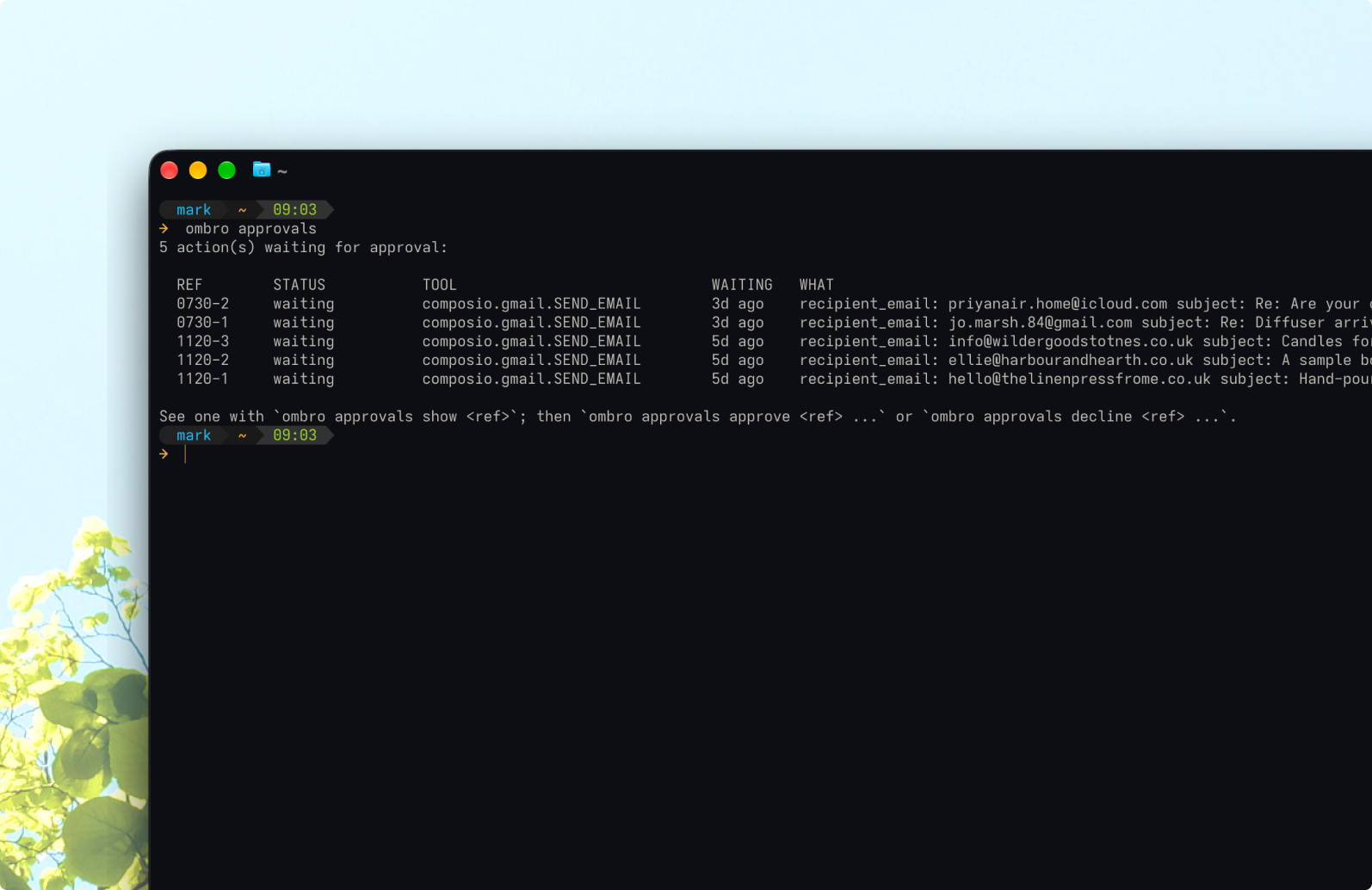
ombro <command> runs one thing and exits. It’s handy for quick checks, scripts and servers. ombro on its own opens the terminal interface instead.
Run ombro --help, or ombro <command> --help, for the options of any command.
Getting started
Section titled “Getting started”ombro init # create your Ombro home, connect a model, then the set-up interviewombro summary # who you are, your crews, what's running and waiting, and new reportsombro preferences [edit] # your name, theme, default crew, editor and approval modeBriefs and jobs
Section titled “Briefs and jobs”ombro brief "find three bakeries" # interview, then save a spec; offers to start itombro specs # saved specs, by nameombro start # brief a task, then start it once you accept the specombro start --spec find-bakeries # start a saved spec (by name or path)ombro start --spec my-spec.md --detach # keeps going after the terminal closesombro start --spec <spec> --crew ops # the crews to use, when the spec names noneombro start --spec <spec> --role marketing-researcher # who does the work, this job onlyombro jobs # list jobsombro status [job] # limits and usageombro journal [job] [--follow] # the event log; --follow shows new events as they comeombro report [job] # the report; any part of the job's name, the latest by defaultombro stop <job> # stop a job; it writes its report firstombro open [job] # open the job's folderombro chat # talk with the Lead; /brief, /remember, /new, /chats insideombro chat --resume [title] # carry on a past chatombro chats # saved chats by titleApprovals
Section titled “Approvals”ombro approvals # what's waiting, across jobsombro approvals show ab12-3 # one in full: tool, arguments, role, reasonombro approvals approve ab12-1 ab12-3 # run the named ones, each at most once; asks firstombro approvals decline ab12-2 # drop it for goodombro approvals edit ab12-3 # change its arguments; it waits for approval againombro approvals resolve ab12-3 sent # settle an uncertain action: sent or not-sentCrews, roles and models
Section titled “Crews, roles and models”ombro crew list # crewsombro crew add legal --title "Legal Team"ombro crew use legal # the default crewombro role list [--crew <crew>] # the Lead, then each crew's rolesombro role add ["Marketing Assistant"] [--crew <crew>] # the Lead interviews you for a new roleombro role edit <crew/role> # or `ombro role edit lead`ombro role rename <role> "New Title"ombro role kind <role> specialist|helperombro role remove <crew/role>ombro models # model connections, their models and who uses eachombro models default | refresh | add # choose the default; refresh model lists; connect anotherombro model [lead | <crew>/<role>] [name] # which model the Lead or a role usesombro chatgpt [sign-in | sign-out | status] # use your ChatGPT plan for model callsTools, keys and folders
Section titled “Tools, keys and folders”ombro tools [server] # tools and MCP servers; a server's tools, class and permissionombro tools web.search --provider duckduckgo --max-calls 30 # change a built-in toolombro tools add <name> [--api | --mcp] # add a web API or an MCP serverombro tools edit <name> # change a web APIombro tools remove <name>ombro connect <server> # sign in to a remote MCP server in your browserombro disconnect <server>ombro keys # keys, masked and what uses themombro keys set FIRECRAWL_API_KEY # typed into a hidden promptombro keys remove FIRECRAWL_API_KEYombro folder # shared folders, and whether each can be backed upombro folder add ~/Documents/Brand # asks read or writeombro folder remove brandSkills
Section titled “Skills”ombro skills # the library, who uses each and proposals waitingombro skills show <name> | edit <name>ombro skills give <skill> <crew/role>ombro skills add <folder> # import a skill from elsewhereLimits and schedules
Section titled “Limits and schedules”ombro limits # what jobs, chats and interviews may useombro limits set generous # conservative, moderate, generous or unlimitedombro schedule # schedules, their next and last jobs and the scheduler entryombro schedule add <name> --spec <spec> --cron "30 7 * * 1-5"ombro schedule show | enable | disable | remove <name>ombro schedule install | uninstall # the one system scheduler entry; asks firstombro tick [--dry-run] # start what's due (the scheduler calls this each minute)Servers
Section titled “Servers”ombro serve # run the server in the foregroundombro serve install # keep it running, now and after a restartombro serve status | removeombro pair # a new pairing code, for a dayombro pair --list # paired devicesombro pair --forget NAME # or --forget-allombro sandbox # whether code a job writes can run here, and if not, whySee Ombro on a server.
For scripts
Section titled “For scripts”Every command that lists or shows something takes --json: jobs, status, report, journal (with --follow, one event a line), keys (names only, never values), specs, role list, crew list, limits, schedule, folder, models, summary, preferences and approvals. approvals approve and decline also take --yes, for a tool that has already shown the actions to you.
Environment variables
Section titled “Environment variables”| Variable | Does |
|---|---|
OMBRO_HOME |
Use a home other than ~/.config/ombro, such as a test or demo home. |
OMBRO_FILES |
Use a visible folder other than ~/Ombro for jobs, chats and files. |
EDITOR |
The editor Ombro opens, unless editor: is set in preferences/config.md. |
© 2026 Ombro, from Heliotrope Atelier Ltd

